

There are three ways you can achieve this.
- Add ‘\n’ at the end of each string
- Add ‘<br>’ at the end of each string
- Add any special character at the end of each string & then in JS file break the lines. (If above options don’t work then go for this one)
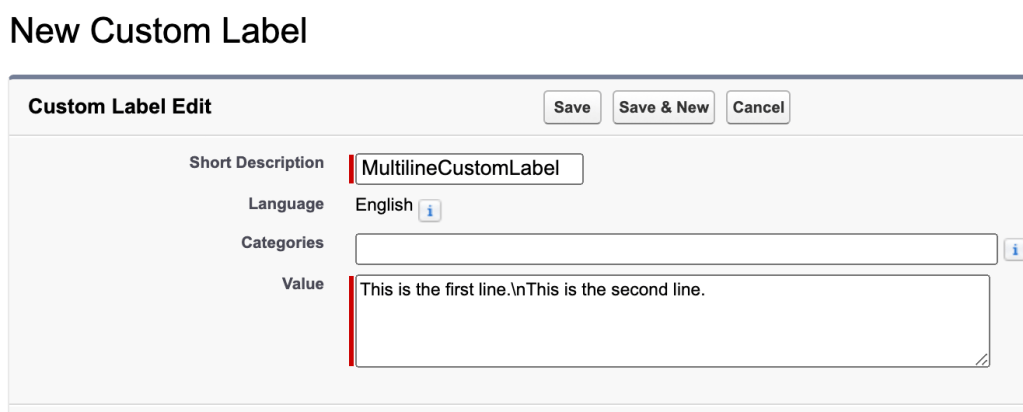
- Add ‘\n’ at the end of each string
When you use this custom label in your Lightning Component, the \n escape sequence will be interpreted as a new line, and the text will appear on two separate lines.
- Add ‘<br>’ at the end of each string
he newline escape sequence \n is not directly recognized and rendered as a line break in the markup. However, you can achieve a line break in your Lightning Component by using HTML markup elements.
To add a new line in your custom label text, you can use the <br> tag in the Value field of the custom label. Here’s an example:

When you use this custom label in your Lightning Component, the <br> tag will be interpreted as a line break, and the text will appear on two separate lines.
In your Lightning Component markup, you can use the aura:unescapedHtml component to render the HTML tags. Here’s an example:
<aura:component>
    <aura:unescapedHtml value="{!$Label.c.MultilineCustomLabel}" />
</aura:component>
- Add any special character at the end of each string & in JS file break the lines
This way we can split the complete string by the special character and store as an array (thus multiline). For example I have taken ‘*’ to split.

Now in LC, you can do as below:
Component:
<aura:component implements="flexipage:availableForRecordHome,force:hasRecordId" access="global" >
    <aura:attribute name="customLabel" type="String" default="" />
    <aura:handler name="init" value="{!this}" action="{!c.doInit}" />

    <p>{!v.customLabel}</p>

</aura:component>
Controller :
({
    doInit : function(component, event, helper) {
        var tempLabel = $A.get("$Label.c.MultilineCustomLabel");
        var tempAry = new Array();
        if(tempLabel && tempLabel.includes("*")){
            tempAry = tempLabel.split("*"); //split custom label by '*'
            component.set("v.customLabel",tempAry);//now variables has values in multilines
        }
    }
})

Did this post help you?
Help to make such content add-free! Note: Target is website maintenance cost
US$1.00
 JPs Blog