

This is the most common challenge developers face, as adding a looking field to custom table or form needs lots of complex coding.
But we can leverage the use of ‘lightning-input-field’ to create a search bar or add lookup field to your form/custom table in LWC.
Case1: Add Lookup field in Custom Table (<table>…</table>) [in case you aren’t using lightning-data-table]
Simply you can add ‘lightning-input-field’ within ‘lightning-record-edit-form’ within <td>…</td>
Case2: Suppose you want to Add a lookup field to change owner then you can’t use ‘lightning-input-field’.
As you have below limitation.
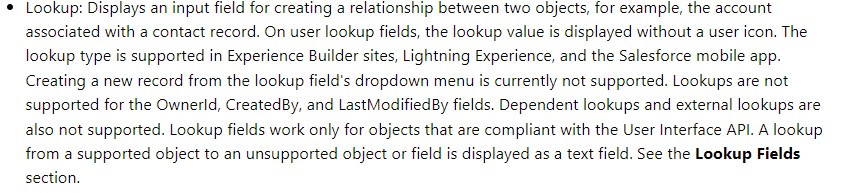
(Image source: https://developer.salesforce.com/docs/component-library/bundle/lightning-input-field/documentation)
In this case you can create a custom lookup field suppose ‘Custom_Owner_Field__c’ which is lookup to user. This field is only for reference and won’t hold any data on record level. Don’t add this field to pagelayout. Note: you can leverage any existing supported lookup field but just to avoid any data manipulation by mistake better to go for a technical lookup field.
Then in JS file you can get the selected value id by ‘event.target.value’ and then save the result either using Apex or wire adaptors and functions (eg. updateRecord).
<lightning-record-edit-form object-api-name="Custom_Object__c">

        <lightning-input-field
            field-name="Custom_Owner_Field__c"
            variant= "label-hidden"
            data-id= "listvar.id"
            value= "listvar.OwnerId"
            onchange={handleChangeOwner}>
        </lightning-input-field>

    </lightning-record-edit-form>

Did this post help you?
Help to make such content ads-free!
US$2.00
 JPs Blog