

As we have already discussed objects, let’s start with fields & relationships. Let’s go back to our college days. Remember as an obedient students, sometimes we have to prepare an excel sheet to maintain details of our friends who haven’t submitted assignments. So we name that excel as an assignment tracker (I named it as devil’s diary :D, I mean punishment is waiting for them). Then there are different sheets named Mathematics, Physics, etc. Inside each sheet, I have added columns like Name, Roll number, etc. Then started adding names and their roll numbers.
Excel:

Complete excel sheet:
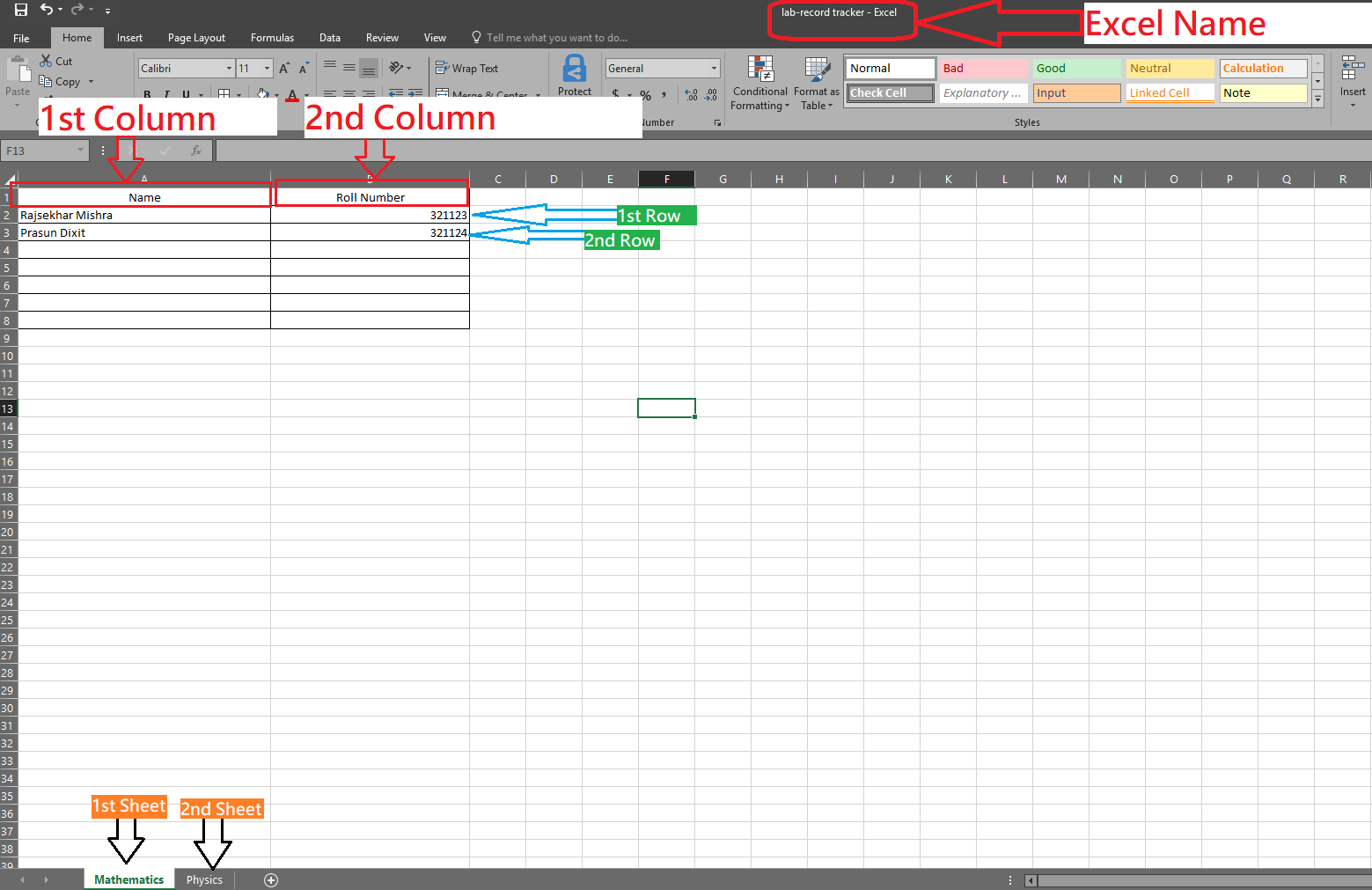
You must be thinking about why I am discussing excel. Don’t worry I am not going to explain excel, but excel is the best example to understand Objects and their structure in salesforce. Let’s come to the point.
So here to store assignment reports we have created one excel, this can be called an object in Salesforce.
Then we have to store assignment details separately for mathematics and physics, so here we didn’t create a separate excel but created two different sheets. So these sheets can be called Record types in salesforce.
And it’s time to add columns like Name and Roll number to store student information. So these columns can be compared to fields in salesforce. And you see I have added Name & Roll number side to side, I can arrange as per my wish. This makes a perfect UI to see the information. So this UI is called a Page Layout in Salesforce.
Once everything is ready, I have added my friend’s details. In excel we call it as rows and in Salesforce we call it records.
Now suppose my teacher doesn’t want me to enter the student name manually but should be a reference from the master sheet which has all student names and from there I need to select a student name. This is called a lookup. This means you have created a link between two excels. Likely in salesforce if you want to link two objects then you need to create the relationships.
There are two types of relationships in salesforce.
- Lookup
- Master-detail
Note: We will discuss this in detail in the ‘How to?’ section.
 JPs Blog